Bridging the Gap: Integrating Flutter Apps with Odoo for Mobile Business Efficiency
In today’s fast-paced business world, Odoo serves as a powerful ERP backbone, while Flutter enables beautiful, high-performance cross-platform mobile apps. Together, they deliver real-time mobility to field teams and streamline operations across departments.
This guide explores the benefits, real-world application, and key technical aspects of Flutter-Odoo integration.
Why Integrate Flutter with Odoo?
Odoo serves as a centralized hub for business data, but accessing it traditionally often means using a web browser or desktop. A custom Flutter app bridges this gap by enabling:
Real-time data access and updates for field teams.
Offline functionality with synchronization when connectivity returns.
Enhanced user experience through native-like interfaces, push notifications, camera integration, and geolocation.
Scalability across departments like sales, service, inventory, and field operations.
Cost efficiency by leveraging Odoo's existing modules while extending reach to mobile users.
Common integration approaches involve Odoo's external APIs (such as RPC calls or custom REST endpoints), allowing the Flutter app to authenticate, read, create, update, and manage records securely.
Technical Architecture
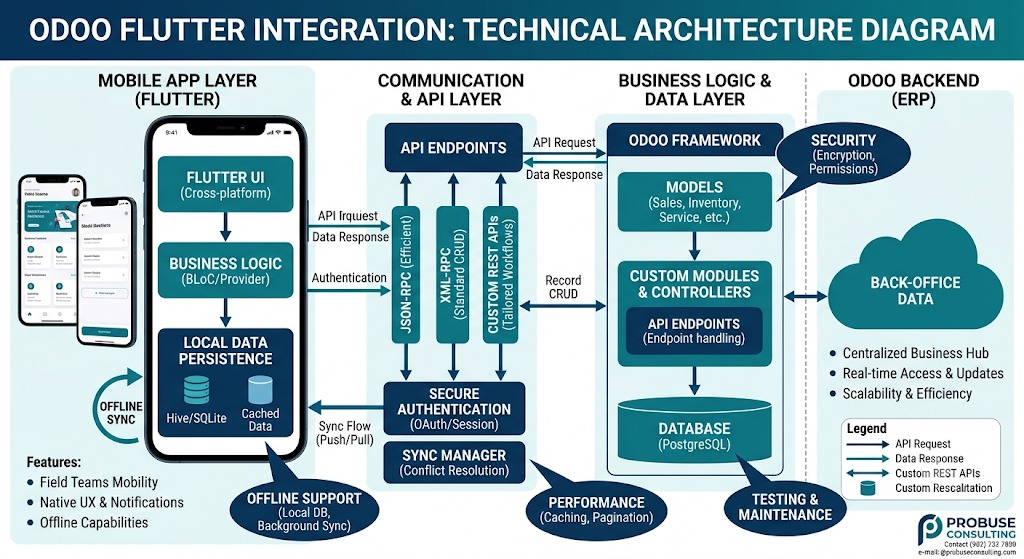
The Flutter app communicates with Odoo through a clean API layer. This architecture ensures secure, efficient data exchange while keeping the mobile experience fast and responsive.
How Flutter Connects with Odoo
Flutter can connect to Odoo using several standard methods:
XML-RPC: Ideal for standard CRUD operations (Create, Read, Update, Delete) on Odoo models. It’s stable and works well for most common use cases.
JSON-RPC: Provides more efficient and lightweight communication, especially useful for high-frequency data syncing.
Custom REST APIs: Built using Odoo controllers for tailored mobile workflows, file uploads, complex queries, or specialized business logic.
These methods allow developers to authenticate users securely, fetch records, submit updates, and handle attachments directly from the mobile app.
Exploring Offline Sync Strategies
Field teams often work in low-connectivity environments. A strong offline sync strategy is essential:
Local Storage: Use packages like Hive or SQLite to cache critical data on the device.
Background Sync: Automatically push changes to Odoo when connectivity returns.
Conflict Resolution: Implement rules to handle data conflicts during synchronization.
Selective Syncing: Only sync necessary modules (e.g., tasks, inventory, or project progress) to reduce data load.
This ensures teams can continue working without interruption and data remains consistent.
Case Study: Streamlining Operations in a Growing Enterprise
Consider a growing distribution company that manages inventory, sales orders, deliveries, and customer support primarily through Odoo. As the business expanded, field sales representatives and warehouse staff struggled with limited mobility, leading to outdated information and slower response times.
The Challenge:
Teams needed instant access to customer data, stock levels, and order status while working remotely or in low-connectivity environments. The web interface was functional but not optimized for quick actions on mobile devices.
The Solution:
The company developed a custom Flutter application tightly integrated with their Odoo instance. The app focused on key workflows:
Sales and CRM: Representatives could view customer histories, update leads, and create quotations on the spot.
Inventory and Warehouse: Staff scanned items (via integrated barcode support), adjusted stock, and processed transfers.
Service and Field Operations: Technicians logged interventions, attached media, and synchronized data seamlessly.
Additional Features: Offline caching for core data, push notifications for approvals or alerts, and role-based access mirroring Odoo's permissions.
Implementation Highlights (High-Level):
The team established secure connectivity between the Flutter frontend and Odoo backend. Authentication handled user sessions safely, while data operations (fetching lists, creating records, or updating fields) leveraged Odoo's standard external interfaces. Local storage in the app ensured functionality during offline periods, with automatic syncing upon reconnection. Custom views in the app were designed for speed and simplicity, focusing on the most-used Odoo modules.
Results:
Productivity Boost: Field teams completed tasks faster with fewer errors, reducing administrative overhead by a significant margin.
Better Decision-Making: Real-time visibility into operations helped leadership respond quickly to inventory shortages or customer needs.
User Adoption: The intuitive interface led to high engagement, with teams quickly embracing the mobile tool over previous methods.
Scalability: As the business grew, adding new features or modules in Odoo extended naturally to the mobile app without major rework.
This integration turned Odoo from a back-office system into a true enterprise-wide platform, supporting both desktop users and a mobile workforce.
Key Considerations for Success
While powerful, successful Flutter-Odoo integrations benefit from thoughtful planning:
Security: Implement proper authentication, data encryption, and permission controls aligned with Odoo's model.
Performance: Optimize data fetching to avoid loading large datasets on mobile; use pagination and caching.
Offline Support: Design for intermittent connectivity with local databases and sync logic.
Maintenance: Keep the app aligned with Odoo updates through modular architecture.
Testing: Thoroughly test across devices, network conditions, and various user roles.
Organizations often start with core modules (e.g., sales or inventory) and expand iteratively based on user feedback.
Conclusion: A Future-Proof Combination
Integrating Flutter with Odoo empowers businesses to bring powerful ERP capabilities directly to their mobile workforce. The result is greater efficiency, better decision-making, and a true competitive edge in a mobile-first world.
Flutter provides the mobility. Odoo provides the intelligence. Together, they create a platform that empowers businesses to operate without boundaries.
Integrating Flutter with Odoo transforms enterprise data from a back-office resource into a real-time operational advantage.